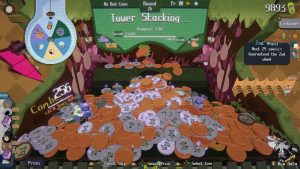
Roguelikes are fun because of the random elements that vary from run to run, and the coin-pushing roguelike Raccoin is no exception. Still, sometimes you just want to have the best items handed to you on a silver platter.
That’s where seeds come in. Every Raccoin run has a randomly generated seed tied to it, determining details like the coins carried in each round’s shop. Whether you’re struggling to beat a high-difficulty Ticket or just want to watch coin-based chaos unfold, these are the best Raccoin seeds.
Best Raccoin Seeds
(Image credit: Doraccoon)
The best seeds in Raccoin have great items for sale in the first few rounds so you can start building a strategy early on.
These seeds can vary a bit between players since you might not have every coin unlocked, but as long as you have a solid chunk of your collection filled out, you should be able to see the same coins for each specific seed. At the very least, make sure you have the coins and prizes mentioned in the table unlocked.
Difficulty levels can also make a difference, especially the ones that affect shop prices and re-roll costs. If you can’t afford to re-roll for a specific item in an early round, some seeds won’t be as fun for you. Plan ahead or bring a different Slot Card to compensate for those penalties.
Chummy Coin Army
Chummy Coins galore
Manager
Buy a Chummy Coin in the first shop, then re-roll and pick up a Rain Badge. In the second shop, buy another Chummy Coin and then re-roll to get a Fault Squishie. Apply the Bug modifier and keep buying Chummy Coins!
Conversion Rate to the Moon!
Grow your Conversion Rate from the first round.
Manager
Buy the Rain Badge and Cloveroin in the first shop. Then, just keep stacking Origin and Bug modifiers (and more Rain Badge prizes) to keep the coins coming!
Returning Dividends
Keep dividing the target score into more manageable amounts.
Manager
Buy the Infinity Squishie and Division Coin in the shop after round four. Apply the Return modifier to the coin, then keep an eye out for more Division Coins to repeat the process with!
Infinite Corncoin
Get a Corncoin from the shop and keep duplicating it for easy wins.
Biologist
Buy the Corncoin in the shop after round four. Duplicate the Corncoin with Return/Bug/Origin from prizes. Use a Clock Squishie to skip the need for watering!
For Profit Farming
Set up giant plants with an all-in-one kit.
Biologist
Buy as many Wateroins as you can. After round four, buy Seedoin and Root Squishie for unlimited plants. With leftover Tickets, buy the Silver Fertilizer chip to buff plants.
Jawbreaker Duplication
Jawbreakoin and Rain Badge in the first shop (after re-rolling).
Trader
Buy the Jawbreakoin and then the Rain Badge. Use the prize to spawn Jawbreakoins, then use a Root Squishie to apply Origin to the Jawbreakoin in your clip. Infinite returns!
Maximum Power
Lightning Coin and Bug modifier in the first shop!
Chemist
Buy the Lightning Coin and Fault Squishie after round one. Use the modifier to keep the Lightning Coins coming! Buy the Battery Coin after round four to score big.
Jupiter Loop
BOGO Jupiteroin early in the game.
Astronomer
BOGO Jupiteroin appears in the second shop. Use modifiers and free Astro coin uses to keep Jupiteroins in your clip. They’ll buff coins caught in their explosions.
Ascending Astrofalls
Stargazy Pie in the first shop.
Astronomer
Buy Stargazy Pie in the first shop. Pick up a Clock Squishy in the second shop and use it with any coins that Astrofall each round. Their value will continually increase!
Fridge Run
Early game Fridgeoin so you don’t have to worry about cooking.
Big Eater
Buy the Fridgeoin in the shop after round four, then buy the Origin modifier in the same shop so you can keep these coins stocked. Scallop Credit Pay shows up later on for continued exchanges!
How to Use Seeds in Raccoin
(Image credit: Doraccoon)
You can apply a seed to your Raccoin run when selecting a Slot Card and Ticket difficulty level. After picking a character, you’ll see two little dots underneath your chosen Ticket.
Clicking the first dot will let you enable or disable Stickers, and clicking the second dot will let you enter a custom seed code. There’s even a handy paste button if you’ve copied a seed from somewhere online—like this page!